
Technology
How to Choose a UK Gaming PC for Your Budget and Games


Choose a UK gaming PC by setting your budget first, then matching it to your screen and games. Put most of your money into the graphics card, then add 16GB of RAM and an SSD, and keep room for upgrades.
Buying a UK gaming PC should feel fun. Instead, it often feels like homework. Prices swing every week, and spec sheets read like a secret code. Choose the wrong parts, and you could burn hundreds of pounds. Veno Scorp builds its custom rigs in-house, and that hands-on view shapes the steps below.
Start With Your Budget Before You Shop for a Gaming PC in the UK
Your budget decides almost everything. So, lock in a number first. Then leave a little room for a monitor, keyboard, and mouse. Plenty of buyers forget those extras, and it stings later. Don’t pay for power you’ll never use. Here’s what each price band usually buys in a gaming PC UK search.
| Budget | Typical Parts | Best For |
| Under £500 | Entry GPU, refurbished or older parts | Esports, Minecraft, Roblox |
| £500 to £999 | Ryzen 5, RTX 5060, 16GB RAM | Fortnite, Valorant, GTA V |
| £1,000 to £1,999 | Ryzen 7, RTX 5060 Ti or 5070, 1TB SSD | 1440p AAA games |
| £2,000+ | Ryzen 7 X3D, RX 9070 XT, 32GB RAM | High-refresh 1440p, light 4K |
Pro tip: Check bundles first, since they already include peripherals.
Match Your Games and Screen to the Right UK Gaming Rig
1080p Gaming Performance for Esports Titles
Do you play Fortnite, Valorant, or Minecraft on a 1080p screen? A mid-tier graphics card is plenty. Esports players care about speed, not fancy visuals. So chase high frame rates instead.
1440p and 4K Gaming for AAA Titles
Cyberpunk 2077 and Red Dead Redemption 2 punish weak hardware. A stronger GPU keeps frames smooth at 1440p. 4K asks for even more power, so plan a bigger budget. Nobody wants lag to steal their win.
Monitor Refresh Rate and Screen Match
A fast PC needs a fitting screen. A 144Hz monitor shows smoother motion than a basic 60Hz panel. Otherwise, you waste the frames your GPU creates. Many popular esports games run well on mid-range cards. You rarely need a top-tier GPU.
Pro tip: Read each game’s recommended specs before you buy. Then pick a PC that beats them.
Spend Smart on the Parts Inside a Gaming PC in the UK
Graphics Card (GPU) Comes First
The GPU drives your frame rates. Spend the biggest share of your money here. Both Nvidia RTX and AMD Radeon cards perform well. Cheap cards age fast, so don’t pinch pennies. A weak one can ruin your next victory.
Processor (CPU) for Smooth Frame Rates
Pair that GPU with a balanced CPU. A Ryzen 5 or Ryzen 7 suits most players. Just avoid a processor that holds your graphics card back. Expert insight: a balanced system beats one flashy part. A top GPU with a weak CPU wastes money.
RAM and SSD Storage for Fast Load Times
Here’s a quick memory and storage guide:
- 16GB RAM: The sweet spot for most games.
- 32GB RAM: Ideal for streaming and heavy multitasking.
- 1TB SSD: Enough space for several big titles.
Skip old hard drives. An SSD loads games much faster.
Power Supply, Case, and Cooling Basics
Don’t ignore the boring parts. A solid power supply protects every other component. Good airflow keeps temperatures low, so your PC stays fast and quiet. Pick a case with space for dust filters and extra fans.
Weigh Prebuilt Against DIY When You Buy a Gaming PC in the UK
Why a Prebuilt Gaming PC Saves Time
A prebuilt gaming PC in the UK option arrives tested and ready to plug in. You skip the part hunting and fiddly assembly. Most systems include warranty cover and UK-based support. Bundles add a monitor, keyboard, and mouse, so you can play right away. Some sellers also offer next-day delivery and finance plans. Short on cash? Refurbished systems can also work, since sellers test them and often add a warranty. Buying online? UK law usually gives you 14 days to cancel.
Here’s a quick comparison:
| Factor | Prebuilt | DIY Build |
| Time | Ready to play | Several hours |
| Support | Warranty and help | Claims per part |
| Cost | Bundles add value | Deals can save money |
| Risk | Low | Higher |
How to Build a Gaming PC at Home
Here’s how to build a gaming PC that UK gamers can finish in one weekend:
- Set a budget and pick compatible parts.
- Check that the CPU fits the motherboard socket.
- Install the CPU, RAM, and cooler on the board.
- Mount the board, power supply, GPU, and SSD in the case.
- Install Windows, then update your drivers.
Building can save money, but it takes time and patience. One wrong part can cost you dearly. Prebuilt systems remove that risk.
Upgrade Paths and Future-Proofing
Pick a PC with room to grow. Upgrade-friendly builds let you swap the GPU, RAM, and storage later. Ask the seller which parts you can swap easily. That protects your money as new games arrive.
Avoid These Costly Mistakes When You Buy a Gaming PC in the UK
Even smart shoppers slip up. Watch out for these traps:
- Ignoring the power supply: A weak unit can crash your system.
- Skipping airflow: Hot parts slow down and wear out sooner.
- Chasing RGB over specs: Looks fade, but frame rates matter daily.
- Choosing 8GB RAM: Modern games need more breathing room.
- Forgetting upgrade paths: Pick a case and board that grows with you.
Fix these early, and your rig will last for years.
Real Gaming PC Picks for UK Players at Every Price
These real systems show how budgets turn into performance:
- Under £500: Browse budget gaming PCs for esports and light titles.
- Around £900: The Spectra pairs a Ryzen 5 5500, RTX 5060, and 16GB RAM from £919.
- Around £1,600: The Mini Nemesis packs a Ryzen 5 9600X and RTX 5060 Ti 16GB from £1,589.
- Around £1,800: The Nemesis 4 runs a Ryzen 7 7700X, RTX 5070, and 1TB SSD from £1,799.
- Premium: The Nemesis 7 ARGB uses a Ryzen 7 9800X3D, 32GB RAM, and RX 9070 XT from £2,449.
Prices were live at the time of writing and may change.
Find Your Perfect Gaming PC Today!
Your ideal UK gaming PC is closer than you think. Set your budget, match your games, and choose balanced parts. Need a hand? Veno Scorp offers personalized advice, flexible finance, and UK-based support. Take the first step today, and start playing sooner.


Ai image generator: Good visuals don’t always have to be about drawing ability, a complex tool, and hours of clicking around on a PC. The emergence of things like Dreamina, which can create images from just a paragraph or two of text, is a huge step forward. For those who want pictures, graphics for social media, images or illustrations of products, they now have a simple way to make creating easier. Simply describe what you want to an AI and wait for it to generate an image. What’s great about these tools is that it allows any new visual makers as well as content and design experts to experiment with fresh visual ideas without staring into a blank screen.
AI Image Creation Has Gone Through Changes
Thanks to Digitization It is fair to say that, thanks to digitization, the creation of visual images has become much more widespread. When making professional-quality graphic design, there was a time when you needed to have a good familiarity with the design application, drawing skills, image manipulation, etc. What’s more, a person would generally need to learn about different applications before producing anything that they felt comfortable with. However, AI has changed this paradigm as well by offering individuals an additional method of creating images.
Make Blog Posts More Engaging
Articles with a suitable visual attached can be much easier to consume and will be more interesting if read by the reader. The visual image is not only an introduction to a particular theme, but is also a means of clarification or splitting up the written work into several sections. Using AI tools, the blogger can make either the main image or auxiliary images that fit their topic very well. For instance, an article with ideas for decorating a house could include a photo of a modern living room, and a guide to a new technical product would probably go along with digital images resembling a futuristic environment. In addition to aiding in the explanation and clarification of points, these kinds of images can be helpful in creating a uniform appearance of the website as well.
The Future of Digital Image Creation
The growing advancement of Artificial Intelligence (AI) technology has resulted in more advanced AI drawing applications where the image creators can have more say in the minute details of their art. Finally, the characters’ appearances should stay consistent so that viewers will recognize who is who, and the quality of editing features will improve as AI understands the details of human imagination. Users’ written requests will be converted into the very image the person sees in his or her head. All the above will be for those who have different jobs and who want to be creative. The marketing companies will then use this to randomly think up a campaign. Meanwhile, teachers and content developers will decide how to pass on the information through images.
Conclusion
Other than this, artists and designers, and other individuals, can aalso utilizethese amazing tools for generating graphics through AI in their different techniques of transforming an image into a graphic. Providing ways of turning the outcome into an illustration, marketing a product, and educational materials are just a smidgeon of it. These tools can help you take full advantage of your manufacturing in the beginning, and at the same time you will be able to generate graphics without being a drawing planet genius.
But that’s not necessarily on AI; that will be the decidingfactor inf the results. The user will have to be able to make the prompt clear and will have to add to that bit of art, and then, like everything else,e it will take some time,errorr, and really good, well-acquired human wisdom. From you can discover the potential of the software and for those who will use in their ethical values and time of responsibility, they will be in the act of discovering a new world to make something creative, to communicate and make nice to the eye.
Frequently Asked Questions
1. What Is an AI Image Generator?
What isan AI photo generator? An AI image generator is a software application or a text-to-image generator that uses AI-based approaches, such as deep learning techniques and neural networks that have been extensively trained on a huge dataset of images, to generate images from text instructions. You give text instructions such as “A cute puppy playing ball with its owner on a sunny day”, and the AI image generator generates an image based on this.
2. Can Newbies Use AI To Make Pictures?
Absolutely. If you don’t have any drawing or design expertise, you can make use of AI and build out your images. It begins with a concept of what you want to capture and then goes into the nitty-gritty detail of the interface platform you have selected to utilize.
3. What Should Be Done To Get Better Prompts?
Specifically, make a detailed list of all possible main subject features, surroundings, lighting, pattern, art style, main object, picture composition, the angles of shooting, etc. The more detailed the prompt is, the more accurately the generated images will reflect what the customer is expecting.

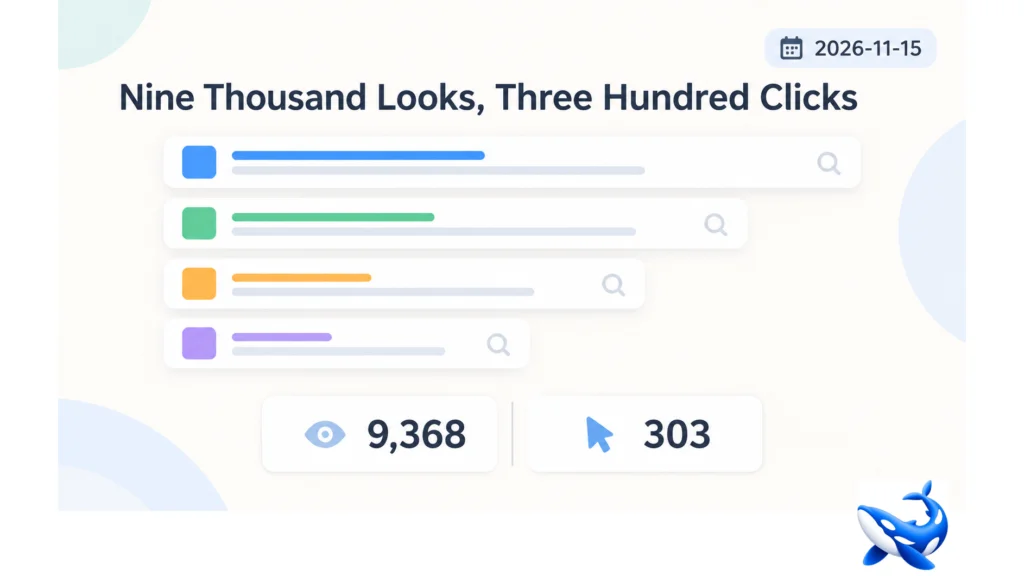
Of the eleven model names OrcaRouter serves on its cyber tier, the Qwen abliterated API attracts among the most search demand on the whole shelf [OURS].
Four Qwen queries drew 9,368 impressions and 303 clicks in the four weeks to 2026-11-09 — a 3.2% click-through rate. The strongest of them sits at position 4.6 and still converts one in fifty impressions.
That gap between ranking and clicking is the subject here, and the answer is not the snippet. It is a single specification row that every one of those searchers is about to discover the hard way.
The four queries
| query | impressions | clicks | CTR | position |
| qwen uncensored | 4,833 | 224 | 4.6% | 5.0 |
| qwen 3.8 uncensored | 2,053 | 31 | 1.5% | 10.3 |
| qwen abliterated | 1,812 | 36 | 2.0% | 4.6 |
| qwen 3.8 flash next abliterated | 670 | 12 | 1.8% | 6.9 |
[OURS], Google Search Console, 2026-10-12 → 2026-11-09.
Two of these are position-5 queries with 1.5–2.0% click rates, which is roughly a quarter of what a position-5 result normally earns. That is the signature of a result whose snippet does not answer the question being asked, and the question being asked is almost certainly “is it free, and where do I call it”.
The third and fourth rows are the ones that matter commercially: “qwen abliterated” and “qwen 3.8 flash next abliterated” are people who already know what they want and are looking for an endpoint. Combined they are 2,482 impressions and 48 clicks.
What those searchers are about to find
The card is called Qwen3.8 Flash Next Abliterated / Uncensored, priced at $0.80 in and $1.60 out, and it accepts text, image and video [OURS].
Its context window is 262,144 tokens.
That is the row. Every other abliterated card on the tier — DeepSeek, GLM 5.3 Flash, MiMo, MiniMax, Hy4 — offers at least 262,144 and five of them offer 1,048,576. The base checkpoint this card was built from offers 1,000,000 [OURS].
So a team that arrives from “qwen 3.8 flash next abliterated” expecting the Qwen they know is getting a quarter of the window. Not a slower model, not a weaker one — a smaller one, at the same price as the cards around it that are four times larger.
That is worth knowing before an integration, and it is not on the snippet.
Why the window shrank
The card is 262,144 and the checkpoint is 1,000,000. A 74% reduction is not an artefact and it is not a documentation error; it is the shape of the abliterated build.
The likely cause is serving economics. A 1,000,000-token window is expensive to keep resident, and a catalogue that offers both a general checkpoint and a specialised card will often provision the specialised one smaller so that its price can stay competitive. Qwen’s card sits at the tier’s standard $0.80/$1.60, and holding a million tokens at that price is a different commercial proposition from holding a quarter of it.
The same pattern appears twice more on the tier: MiniMax M3.1 Flash is a quarter of its base on both context and output ceiling, and Hy4’s base carries a 64,000-token ceiling against the card’s 65,536. Small windows on abliterated builds are the norm rather than the exception.
What is unusual is that Qwen’s base is the largest on the tier. A million tokens dropping to a quarter is the biggest single shrink here in absolute terms.
What a quarter of a million tokens holds
Concretely, and it is more than it sounds.
A 200,000-token repository — a mid-sized monorepo, a large service, a well-commented codebase. Fits with room for a question.
Fifty long documents at 5,000 tokens each. A full case file.
A four-minute video at one frame per second, or twenty minutes at one frame every five seconds [OURS, our approximation].
A week of logs if you sample rather than ingest everything.
What it does not hold is the thing the million-token cards are sold for: an entire large repository plus its history plus the incident, in one call. A team doing repository-scale audit work will hit the ceiling on the first attempt and will be chunking by the second week.
The protocol surface, which is the card’s real argument
Seventeen parameters, all three endpoint shapes — chat-completions, Responses and Messages — with ZDR available and a 1,838 ms median [OURS].
That combination is rarer than it sounds. Six of the eleven cards are chat-only; Qwen is one of five that speaks all three. For a team standardising on one client shape and routing across the tier, that is the difference between a card that fits the integration and one that needs a special case.
Its serving rows are also strong: 94.0 output tokens a second, third fastest in the tier, and 0.603% errors, third lowest [OURS]. Neither is the best, and both are comfortably above the middle.
So the card is well equipped and slightly small. That is a coherent product, and it is not the one the search queries describe.
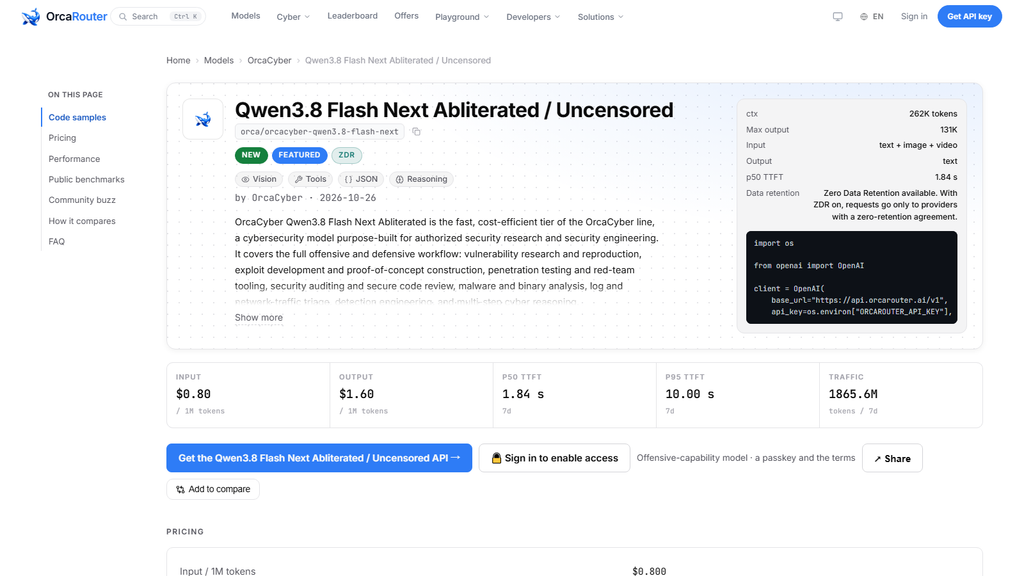
The traffic confirms it
1.86 billion tokens in the seven days to 2026-11-15 — second lowest on the abliterated side, and a nineteenth of DeepSeek’s 32.99 billion at the same price [OURS].
Nine thousand searches a month for Qwen abliterated and 1.86 billion tokens a week of usage is not a mismatch. It means the searchers arrive, look at the window, and most of them choose a different card.
The two quiet cards on the abliterated side are Qwen and MiniMax, and both have 262,144-token windows. The six loud cards all have at least 262,144 and five have a million. That correlation is not proof and it is the cleanest explanation in the data.
The base checkpoint’s own traffic makes the same point from the other side: 4.00 billion tokens a week against a window four times larger, at a fifth of the card’s price, before you even reach the abliterated build.
How to choose, given all of it
Three questions, in order.
Does your prompt exceed 262,144 tokens? If yes, this is not your card — take GLM 5.3 Flash or MiMo at a million, at the same price. If no, the window costs you nothing and the card’s protocol surface and serving rows are the argument.
Do you need all three endpoint shapes? If you are standardising a client across the tier, Qwen is one of five cards that will not need a special case. That is worth real engineering time.
Do you need video? Five cards take it and Qwen is one. If video is on your roadmap and your prompts are small, it is a reasonable single-card answer.
The card is a good fit for a team with short prompts, a standard client and a video requirement. That is a narrower group than the search volume suggests, and it is the group the card is actually built for.
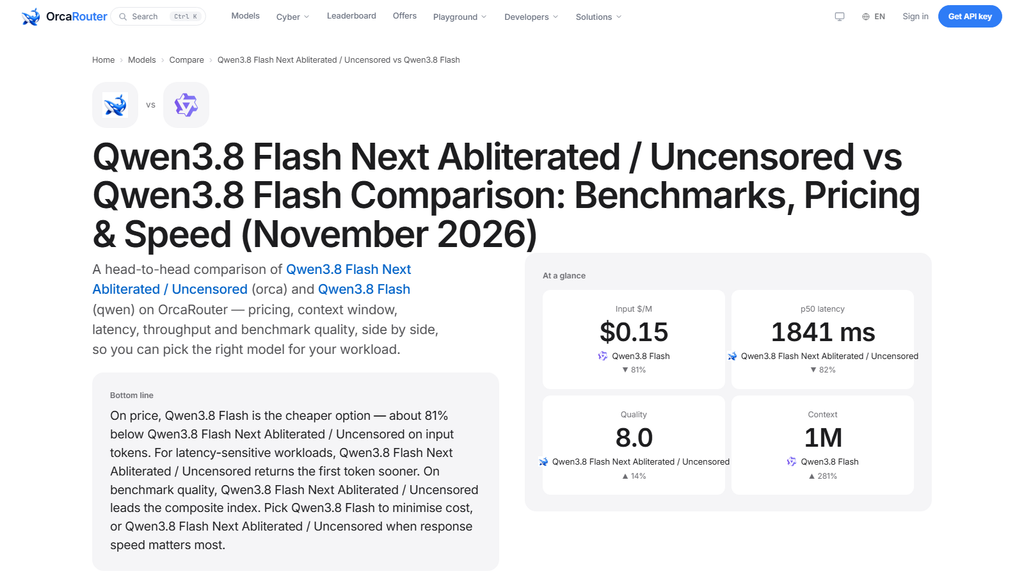
The short version
9,368 impressions and 303 clicks across four Qwen queries, at positions that should convert far better than 3.2%. The reason they do not is a 262,144-token window on a card whose base offers a million.
The card is genuinely good on every other row — 94.0 tokens a second, 0.603% errors, all three endpoint shapes, ZDR — and its traffic is 1.86 billion tokens a week, which is what a good card with a small window looks like.
Check your prompt size first. Under 262,144 tokens the window costs nothing and the protocol surface is worth having; above it, five cards at the same price will do the job.
Sourcing note: search impressions, clicks, CTR and positions are OrcaRouter’s own Google Search Console data for 2026-10-12 → 2026-11-09 [OURS]. Context windows, output ceilings, prices, parameter surface, endpoint types, ZDR flag, latency, throughput, error rates and traffic are read from the eleven cards’ public model data on 2026-11-15, with seven-day windows ending that day [OURS]. Frame-budget arithmetic is our own approximation. No benchmark rows are quoted.


A missing DLL file or game launch error can prevent your favorite PC games from opening properly, ruining your gaming experience. These issues can occur due to outdated, corrupted, or missing drivers and essential system components. Fortunately, Driver Booster offers a convenient way to identify and update outdated drivers that may contribute to these problems. Instead of manually searching for compatible driver versions, users can scan their PCs and install available updates with just a few clicks. In this guide, we will explore how Driver Booster can help solve game launch errors and missing DLL files in Windows 11 and improve gaming performance.
Part 1: Common Reasons Behind Game Launch Errors and Missing DLL Files
There are several reasons for game launch errors and missing DLL files in Windows 11. Below, we have highlighted some common reasons why your favorite PC games might fail to launch or display missing DLL file errors:
- Outdated Graphics Drivers: One of the most common causes is outdated or incompatible graphics drivers.
- Missing DLL Files: Games rely on specific DLL files to perform essential functions. If these files are missing or corrupted, the game may fail to start.
- Corrupted Game Files: Incomplete downloads, interrupted installation, or accidentally deleted files can damage game installations and trigger launch errors.
- Outdated Windows Components: Running an outdated version of Windows 11 can sometimes create compatibility issues with newer games.
Part 2: What is Driver Booster?
If you are looking for a simple way to fix game launch errors and missing DLL files in Windows 11, IObit Driver Booster can be a helpful solution. It is a driver management tool designed to scan your PC, identify outdated, missing, and faulty drivers, and update them to the latest version without any manual effort. In addition, Driver Booster offers amazing tools that can fix multiple game-related issues, such as missing DLL files. Fix Missing Game DLLs feature scans automatically, identifies, and repairs missing DLLs and game components. It supports 680+ DLLs and 60+ game components. Plus, it also includes Real-Time DLL Detection to detect missing DLLs and provide pop-up alerts with one-click repair.
Part 3: Key Features of Driver Booster

Driver Booster offers several useful features that can help fix game launch errors and missing DLL files while improving overall PC performance. Below, we’ve listed the top features of this driver updater:
- Fix Missing DLL Files Error: Driver Booster includes a dedicated Fix Missing Game DLLs feature that automatically scans your system to detect missing or problematic DLL files. It supports more than 680 DLL files and 60 game components, helping users resolve common errors that prevent PC games from launching.
- Automatic Driver Updates: Another amazing feature of Driver Booster is that it enables users to automatically update missing, corrupted, or faulty drivers to the latest version without any manual effort, helping users fix common issues like game launch errors on Windows 11.
- 23 Million+ Drivers: One of the standout features of this tool is that it supports over 23+ million drivers from 1200+ brands, including Dell, HP, Lenovo, Brother, AMD, Intel, Logitech, Canon, Realtek, Song, Samsung, LG, MSI, Microsoft, ASUS, NVIDIA, and TP-Link.
- Multi-Version Scanning: The latest Driver Booster equips a brand-new scanning engine and a revamped installation core. It supports multi-version driver scanning and detection, allowing users to identify different available driver versions for their installed hardware. This makes it easier to find suitable updates.
- User-Friendly Interface: Driver Booster offers an intuitive interface, which enables users to download and update drivers without technical knowledge. This makes Driver Booster ideal for non-tech and beginner users, allowing them to update drivers without professional help.
Part 4: How to Fix Game Launch Error and Missing DLL Files in Windows 11 Using Driver Booster
Driver Booster enables users to fix game launch errors and missing DLL files in Windows 11 with a single click. Here is how to do it:
- Go to the IObit official site and download the latest version of Driver Booster for your PC. Install and launch it. Next, select the “Tools” option from the left panel. Multiple tools will appear on your screen, including “Fix Missing Game DLLs,”

- Click on the “Fix Missing Game DLLs” option. Next, click on the “Scan” button to start the process and let Driver Booster examine your system. Once the scan is complete, the program will display the detected missing DLL files and game components.

- Click the “Fix” option to allow Driver Booster to repair the detected issues. The program will automatically handle the repair process for supported components, eliminating the need to search for and install individual DLL files manually.
Part 5: FAQs Related to Driver Booster
- How to Update Drivers Using Driver Booster?
Simply launch the program on your PC and click on the “Scan” button. Once the scanning process is complete, click on the “Update Now” button to install the latest version of the drivers.
- Is Driver Booster Free to Use?
Yes, Driver Booster offers a free version, allowing users to update drivers to the latest version without spending a single penny.
Final Thoughts
Game launch errors and missing DLL files can be irritating, especially when you are excited to play your favorite PC games. Fortunately, IObit Driver Booster offers a convenient way to troubleshoot these issues through its dedicated Fix Missing Game DLLs feature.

An Easy Method to Make Your Visions Into Visuals

How ABA Therapy Helps Children Build Skills That Last a Lifetime

Stop a Roof Leak Before It Becomes a Bigger Problem

Nancy Simon: Meet Neil Simon’s Daughter and Woody Harrelson’s Ex Wife

Who Was Russell Derek? Inside The Life of John Derek’s Son

Steven Fleischmann: Inside the Love Story of Erin Moran and Her Husband
-
 Celebrity2 months ago
Nancy Simon: Meet Neil Simon’s Daughter and Woody Harrelson’s Ex Wife
-
 Biographies5 months ago
Who Was Russell Derek? Inside The Life of John Derek’s Son
-
 Biographies5 months ago
Steven Fleischmann: Inside the Love Story of Erin Moran and Her Husband
-

 Biographies5 months ago
Who is Kassidy Duhamel? All About the Life of Josh Duhamel’s Sister
-

 Biographies5 months ago
Caleb Michael Jackson: The Untold Story of Lisa Vultaggio and Jonathan Jackson’s Son
-

 Biographies5 months ago
Micah Emmanuel Lanfer: All About the Life of Sarah Drew and Peter Lanfer’s Son
-

 Biographies5 months ago
Who is Bear Beghe? All About the Life of Jason Beghe’s Son
-

 Technology3 months ago
BotPower Explained: A Complete Guide to IMVU Tracking Tools